This page explains how to physically connect your PiEEG-8 shield, Raspberry Pi, and electrodes before starting a recording session.
Step 1 — Attach the PiEEG-8 Shield
Align the PiEEG-8 shield with the 40-pin GPIO header on your Raspberry Pi and press it firmly into place. Make sure all pins are seated correctly before powering on.
Step 2 — Connect the Electrodes
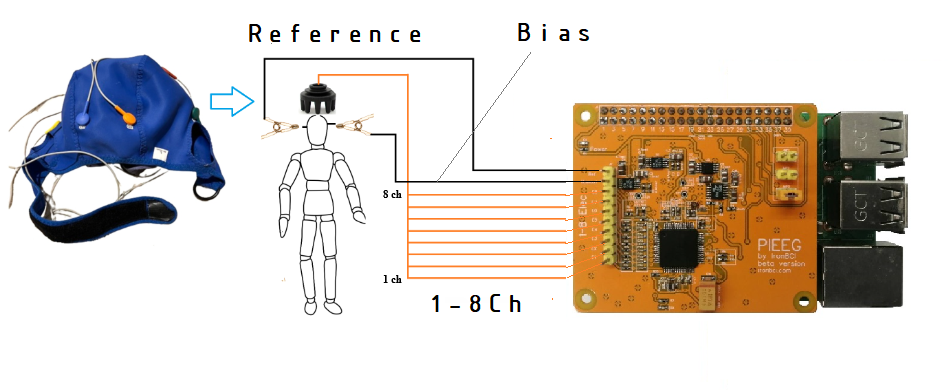
PiEEG-8 uses three types of electrode connections:
- Channel Electrodes (1–8)
Connect 8 EEG electrodes to channels 1 through 8. These are placed on the scalp according to the 10-20 system and capture the EEG signal. - Reference Electrode
Attach a clip electrode to one ear. This provides a stable voltage reference for all 8 channels. - Bias Electrode
Attach a second clip electrode to the other ear. This actively cancels electromagnetic interference from the signal, reducing noise.
Refer to the connection diagram image above for the exact pin positions of each electrode on the PiEEG-8 connector header.
Step 3 — Power On
Connect your power bank to the Raspberry Pi. Once booted, proceed to Software Setup to install and launch PiEEG Server.
A full PDF quick start manual with connection diagrams is available on GitHub (opens in a new tab) with SDK launch