Octopus 16
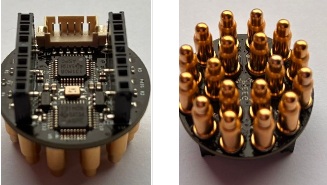
Octopus 16 is a 16-channel device designed to measure biosignals — including EEG (electroencephalography), EMG (electromyography), and ECG (electrocardiography).
What It Does
Octopus 16 brings high-density biosignal acquisition to microcontrollers the Seeed Studio ESP32-S3, enabling portable, wireless, and low-cost 16-channel EEG data acquisition. It utilizes Texas Instruments analog front-end chips (such as the ADS131M08) to capture high-quality 24-bit biosignal data.
Octopus 16 is ideal for researchers, students, and developers building advanced BCI prototypes, wireless neural-interface applications, and multi-channel embedded BCI setups.
Key Features:
- 16-Channel Support: Measures up to 16 channels of EEG, EMG, or ECG data simultaneously.
- 24-bit ADC Resolution: Powered by high-precision ADS131M08 analog front-end chips.
- Wireless & Portable Firmware: Supports firmware written for Seeed Studio XIAO ESP32 S3 with Bluetooth streaming options.
- Developer Tools: Includes Python-based data processing scripts (FFT, signal visualization) and GUI visualization tools (
SDK_Data_Visual.py). - Low Power: Suitable for wearable, battery-powered BCI applications.
How It Differs from PiEEG:
Comparison: PiEEG vs. Octopus 16
| Feature | PiEEG | Octopus 16 |
|---|---|---|
| Host / MCU | Raspberry Pi 3 / 4 / 5 | Seeed Studio XIAO (ESP32-S3 |
| Channels | 8 | 16 |
| Analog Front-End | ADS1299 | ADS131M08 |
| Connectivity | SPI Direct Header | SPI / Wireless Bluetooth |
| Best for | Standard 8-ch research, single-board Linux setups | High-channel wearable BCI, wireless prototyping, embedded |
Pogo Pin Care & Maintenance
[!IMPORTANT]
Important Notice: Pogo Pin Care & Maintenance
The Octopus 16 utilizes high-precision spring-loaded pogo pins to ensure reliable electrical contact. Over time and under heavy usage, individual pogo pins may become stuck, compressed, or jammed inside their housing.
🔍 Why Do Pogo Pins Get Stuck?
Pogo pins rely on an internal spring mechanism. A pin becomes stuck (impacted) primarily due to external environmental factors:
- Dirt, Dust, and Debris: Fine particles, dust, and hair inside the pin housing can block the internal spring.
- Liquid Contaminants: Oils, moisture, or sticky substances entering the pin barrel cause the internal mechanism to seize.
- Side-Angle Pressure or Excess Force: Applying lateral pressure during insertion or over-compressing the pins can cause mechanical binding.
⚠️ Important Disclaimer & Policy
- User Responsibility: Contamination, dirt accumulation, and mechanical wear resulting from improper handling or environmental exposure are not covered under warranty.
- Continued Usage: If one or more pins become stuck or impacted, the Octopus 16 can often still function, provided the stuck pins maintain adequate contact with the skin for data transmission.
🛠️ Best Practices to Prevent and Fix Stuck Pins
To maintain optimal performance and prevent pins from sticking:
1. Keep the Pins Clean
- Periodically clean the pin tips with an Isopropyl Alcohol (IPA > 90%) swab or brush to prevent sticky buildup.
- Use compressed air to blow out loose dust or debris from around the pin bases.
2. Handle with Care
- Insert and align the device straight down vertically ($90^\circ$ angle). Avoid pushing or tilting the pins sideways while under pressure.
- Do not force or over-compress the header beyond its intended travel limit.
3. How to Unstick an Impacted Pin
- Apply IPA: Place a drop of high-purity Isopropyl Alcohol (IPA) directly into the affected pin's barrel to dissolve internal grime or sticky residues.
- Exercise the Plunger: Lightly tap or exercise the plunger gently with a non-metallic tool to help the internal spring push back up.
- Dry Thoroughly: Allow the IPA to fully dry before powering on the device.
[!WARNING]
Do not use oil-based lubricants or grease, as they attract more dirt and permanently damage electrical conductivity.