What's in the Box
Included
| Item | Details |
|---|---|
| 1 × Octopus 16 | 26 mm board with 18 pogo-pin electrodes, 2 × ADS131M08 and sockets for a Seeed Studio XIAO |
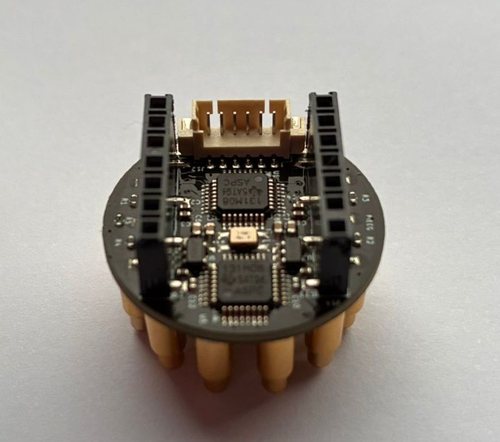
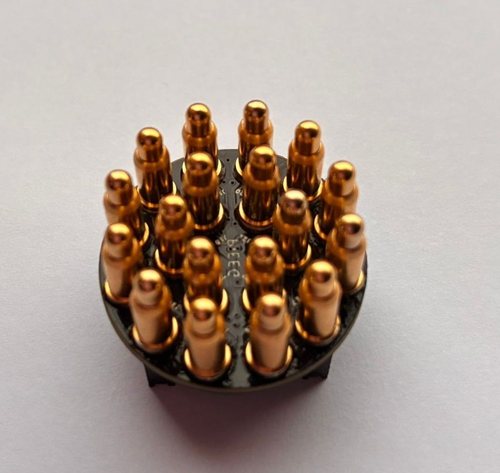
Not included
| Item | Requirements | More |
|---|---|---|
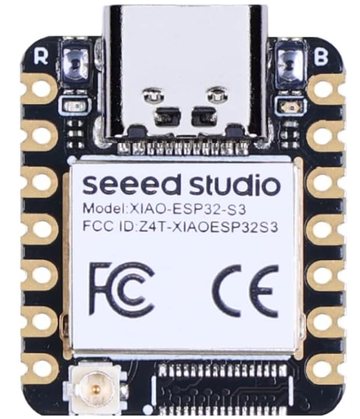
| Seeed Studio XIAO ESP32-S3 | The controller that sits on top and sends data over Bluetooth. Comes with a small BLE antenna. Usually sold without soldered pins, so solder the headers first or buy a pre-soldered version. | How to Start |
| 5 V power bank | Small and light, 5 V output, no more than 2 A. Powers the board while it's worn. | Safety |
| USB-C data cable | For flashing the firmware once, and for the power bank. Must be a data cable for flashing. | Firmware |
| Strap or headband | Holds the sensor on the head. An elastic band works, or a 3D-printed holder (opens in a new tab). | Pins & Placement |
| A device with Bluetooth LE | A computer or Android device with Chrome or Edge (for PiEEG Cloud and octoBridge), or Python 3.10+ for the Python SDK | Software |
⚠️
Charge-only cables can't flash. If no serial port appears when you plug in the XIAO, try a different USB-C cable before anything else.
Safari, Firefox and iPhone / iPad browsers don't support Web Bluetooth. Use Chrome or Edge.
Checklist
- Octopus 16
- XIAO ESP32-S3 with headers soldered, and its BLE antenna
- USB-C data cable
- Charged small 5 V power bank (≤ 2 A)
- Strap or headband
- Chrome or Edge on a device with Bluetooth LE
Next: How to Start