Contact Calibration
EEG is easy to record badly. A loose electrode, dry hair under a pad or a cable picking up mains hum can ruin a session, and you often won't notice until you look at the data afterwards.
Contact Calibration is a quick pre-flight check in the dashboard. It reads the live stream from your PiEEG device and shows, channel by channel, whether the signal is clean enough to record. It takes a few seconds, and you start recording knowing your data is good.
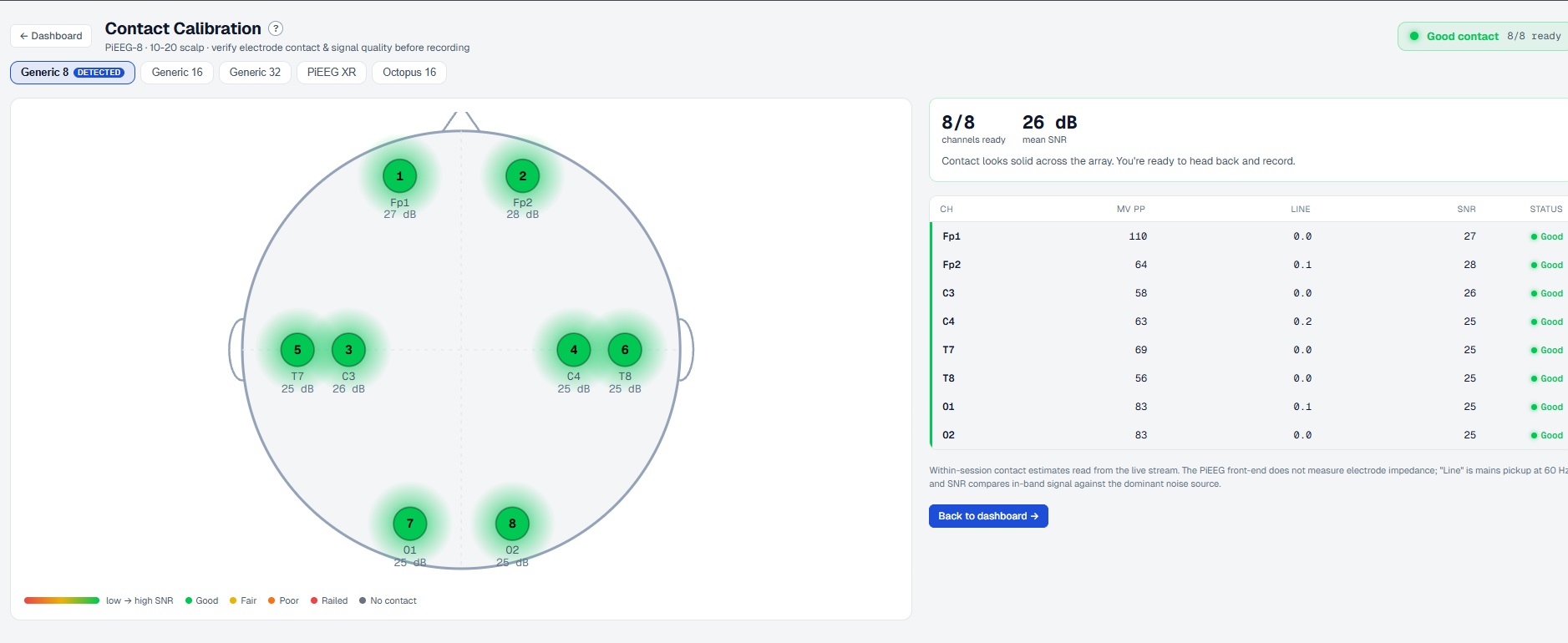
Example of how it works for PiEEG XR
How to launch Calibration in PiEEG Server
Supported devices
The device is detected automatically and its layout is selected for you (marked DETECTED). You can also switch layouts manually:
| Layout | Channels |
|---|---|
| Generic 8 (PiEEG-8) | 8 |
| Generic 16 (PiEEG-16) | 16 |
| Generic 32 | 32 |
| PiEEG XR | XR headset layout |
| Octopus 16 | 16 |
How to use it
Put on the electrodes
Place the electrodes in the 10-20 positions for your device and connect the board.
Open Contact Calibration
In the dashboard, open Contact Calibration. Streaming starts and the head map lights up within a second or two.
Fix anything that isn't green
Each electrode on the head map is colored by its signal quality. If a channel shows Fair, Poor, Railed or No contact, adjust that electrode (press it down, part the hair, add gel or saline) and watch the color update live.
Record
When the badge in the top-right says Good contact and all channels are ready, click Back to dashboard and start recording.
Reading the screen
Head map
A top-down view of the head (nose at the top) with each electrode at its 10-20 position. Every electrode shows its channel number, label (Fp1, C3, O1…) and current SNR in dB. The glow color runs from red (low SNR) to green (high SNR).
| Status | Meaning |
|---|---|
| 🟢 Good | Clean signal, ready to record |
| 🟡 Fair | Usable, but contact could be better |
| 🟠 Poor | Noisy, fix before recording |
| 🔴 Railed | Signal saturated at the amplifier limit, usually a loose or disconnected electrode |
| ⚫ No contact | No signal from this electrode |
Summary
- Channels ready: how many channels currently have good contact (for example
8/8). - Mean SNR: average signal-to-noise ratio across all channels.
- A one-line verdict telling you whether you're ready to record.
Channel table
| Column | Meaning |
|---|---|
| CH | Electrode label |
| µV PP | Peak-to-peak amplitude of the signal, in microvolts |
| LINE | Mains (power-line) pickup at 50/60 Hz. Close to 0.0 is best |
| SNR | In-band EEG signal compared with the dominant noise source, in dB. Higher is better |
| STATUS | Good / Fair / Poor / Railed / No contact |
These are within-session contact estimates calculated from the live stream. The PiEEG front-end does not measure electrode impedance directly, so Contact Calibration judges contact by signal quality instead.
Tips for clean data
- High LINE value: move away from chargers and power cables, run on battery, and check the reference/bias electrode.
- Railed channel: the electrode is usually off the skin or the wire is loose. Reseat it.
- Low SNR on one channel only: that electrode needs better contact. If every channel is low, check the reference and ground first.
- Stay still for a few seconds while checking. Blinks and jaw clenching briefly lower SNR on frontal and temporal channels.
See also Signal Quality and Noise Elimination.