How to Start
Open the lab, flash once, connect, put it on, build. Everything happens in one browser tab at octobridge.pieeg.com (opens in a new tab).

Gather the kit
The box has both devices. You add the power bank and the computer. See What's in the Box.
Open the lab in Chrome or Edge
Go to octobridge.pieeg.com (opens in a new tab) in desktop Chrome or Edge. The lab needs Web Bluetooth and Web Serial, which only those browsers have.
No account, no install. The Bluetooth and USB connections stay in the tab; nothing is uploaded to a PiEEG server.
| Page | What you do |
|---|---|
| Home | What you can read, what you can move, ready mixes |
| Flash | Put firmware on the boards. First time only. |
| 1 · Connect | Pair the Octopus 16 and/or the starter kit |
| 2 · Board | Live numbers, lights, motor and screen |
| 3 · Blocks | Stack a program and run it |
| 4 · Learn | What a reading is allowed to mean |
| 5 · Write | The same program, written like a page |
| 6 · Repeat | Six ready machines to run and remix |
Flash the firmware once
Open Flash (opens in a new tab), plug each board in with a USB data cable and install its firmware from the browser. No Arduino IDE. You only do this the first time.
Full instructions: Firmware Flashing.
Connect both devices
Open Connect (opens in a new tab). Both devices stay live at once. Skip a device you don't have: its numbers stay still until it's connected.
- Power the Octopus 16 from the power bank, then choose
Octopus-16-XXXXin the Bluetooth picker. - Plug the starter kit into the computer and choose its port in the serial picker.
- When the port opens, the kit restarts. Wait until its status says live. The kit answers at 115200 baud with:
INF protocol=1 readyPut on the Octopus 16, on battery only
Strap the Octopus 16 over the back of the head (the visual cortex) so alpha shows up clearly. Press it straight down so every pin touches the scalp.
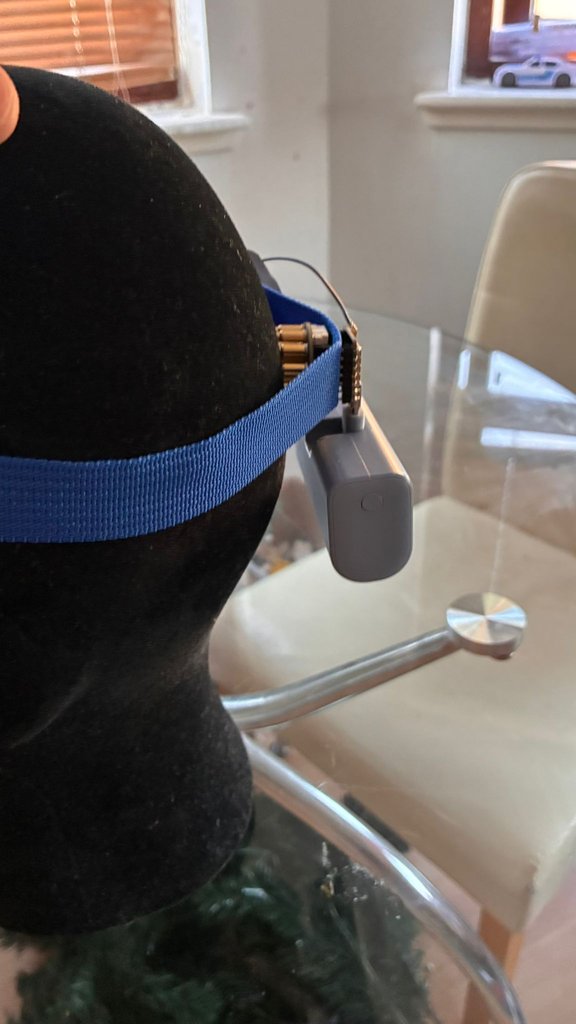
The board has no isolation from its power supply. While it's on a head, it runs from the power bank only, never plugged into a computer or a wall charger.
| Power source | While worn |
|---|---|
| 5 V power bank | ✅ Safe. No path to the mains. |
| Laptop USB | ❌ Not while worn. USB is only for flashing, with the board off the head. |
| Wall charger | ❌ Never. It connects the person to the mains through the electrodes. |
Check the signal
On Board (opens in a new tab), look for the EEG ok check: RMS between 2 and 200 µV. Then run two quick tests. If they behave as described, you're reading real biosignals.
| Test | What you should see |
|---|---|
| EEG ok is green | RMS between 2 and 200 µV |
| Close your eyes for 10 seconds | Alpha rises, then drops when the eyes open |
| Blink and clench the jaw | RMS and gamma jump, then settle |
| Sit still for the first run | Movement shifts the pins |
A blink or a jaw clench raises RMS and gamma. That's muscle, not a thought, and a good first lesson.
Build with blocks
Open Blocks (opens in a new tab), stack forever, if, wait and a move, and press Run. The program runs live and sends commands to the kit, so there's no compiling and no second sketch to flash.
forever
  if  alpha is high
      light D10 on
  else
      light D10 off
Eyes closed → alpha rises → the LED turns on.
Start with Follow the knob: it needs no headset. Then try a ready mix from Repeat, or the Lessons.