How to Start
From a bare Jetson Nano to live EEG in your browser, in eight steps.
Gather the parts
You need the JNEEG, a Jetson Nano, a 5 V / 3 A power bank, 8 electrodes with two ear clips, and a cap. See What's in the Box.
Prepare the Jetson Nano
- Flash NVIDIA's JetPack image for the Jetson Nano Developer Kit to the microSD card (NVIDIA's guide (opens in a new tab)).
- Boot it, finish the first-run setup and connect it to the internet (needed only for installing software).
Enable SPI
SPI is off by default on the Jetson Nano. Turn it on with NVIDIA's tool:
sudo /opt/nvidia/jetson-io/jetson-io.pyIn the menu: Configure 40-pin header → enable spi1 → Save and reboot. After the reboot, check:
ls /dev/spidev0.0Then let your user use SPI and GPIO without sudo, and log out and in again:
sudo groupadd -f spi
sudo usermod -aG spi,gpio "$USER"
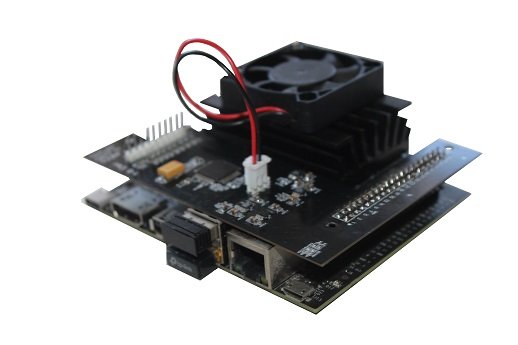
Mount the shield
- Shut down the Jetson and unplug the power.
- Line up the JNEEG with the 40-pin header so pin 1 matches pin 1.
- Press it down evenly until every pin is seated.
Connect the electrodes
| Connector | Electrode | Where it goes |
|---|---|---|
| Channels 1–8 | 8 EEG electrodes in the cap | Scalp positions of the 10-20 system |
| Reference | Ear-clip electrode | One earlobe |
| Bias | Ear-clip electrode | The other earlobe |
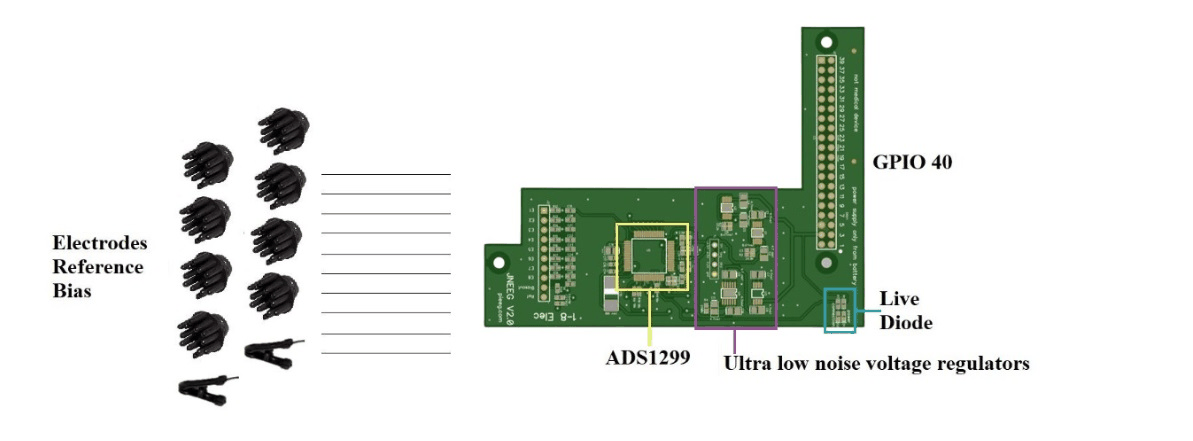
Details: Electrodes & Pinout.
Power on from the battery
- Connect the monitor, wired keyboard and mouse. The monitor must be powered from the power bank or the Jetson.
- Plug the power bank into the Jetson's Micro-USB power input.
- The status LED on the JNEEG lights up.
The JNEEG has no isolation from its power supply. While electrodes are on a person, the Jetson, the shield and everything cabled to them must run from the power bank only.
Install and start PiEEG Server
python3 -m venv .venv
source .venv/bin/activate
pip install --upgrade pip
pip install "pieeg-server[rpi]"

pieeg-server doctor           # check SPI, GPIO and dependencies
pieeg-server --device jneeg   # start streaming 8 channels
--device jneeg applies the Jetson Nano settings automatically (600 kHz SPI, GPIO on /dev/gpiochip0).
PiEEG Server needs Python 3.10 or newer. JetPack 4 for the Jetson Nano ships Python 3.6, so install a newer Python first (or use an image with Python 3.10+). Prefer no install? The Python scripts run on the stock Python.
Check the signal
Open http://localhost:1617 (opens in a new tab) on the Jetson, or http://<jetson-ip>:1617 from a battery-powered laptop. Click Connect, sit still and relax the face.
| Test | What you should see |
|---|---|
| Sit still for 30 seconds | All 8 channels settle. Flat lines or huge values mean a loose electrode. |
| Close your eyes for 10 seconds | Alpha (8–13 Hz) rises on the back-of-head channels, then drops when the eyes open |
| Blink a few times | Large slow spikes on the front channels |
| Clench the jaw | Bursts of high-frequency noise on all channels. That is muscle (EMG), not brain activity. |
Next steps
- Record, stream, run ML: see Software.
- No samples or noisy? See Troubleshooting and Noise elimination.