Specification
Everything you need to know about the hardware, plus the low-level details for writing your own driver.
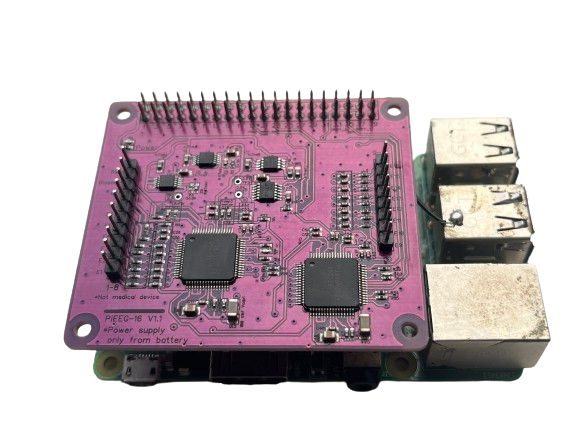
Hardware
| Channels | 16 single-ended biosignal inputs (2 groups of 8) |
| Extra inputs | Reference (SRB1, common to all channels) and bias drive |
| Analog front end | 2 × Texas Instruments ADS1299, 8 channels each |
| Chip arrangement | Two independent chips on one SPI bus, each with its own chip select and DRDY line (not daisy-chained) |
| Resolution | 24-bit, delta-sigma |
| Sample rate | 250 SPS as set by PiEEG software (the ADS1299 supports 250 SPS to 16 kSPS) |
| Gain | 1 as set by PiEEG software (ADS1299 supports 1, 2, 4, 6, 8, 12, 24) |
| Reference voltage | 4.5 V internal |
| Signals | EEG, EMG, ECG |
| Electrodes | Dry or wet Ag/AgCl |
| Electrode connectors | 2.54 mm pin headers (channels 1–8, channels 9–16, reference, bias) |
| Host | Raspberry Pi 4, Raspberry Pi 5 |
| Host connector | 40-pin GPIO header |
| Interface | SPI0, plus 2 DRDY lines and a software chip select |
| Power | 5 V via the Raspberry Pi, from a battery (power bank) only |
| Isolation | None. Battery operation is required. |
Software support
| Software | Device setting |
|---|---|
| PiEEG Server | --device pieeg16 (default) |
| Python SDK (opens in a new tab) | GUI/pieeg16_drdy_only.py, Save_data/Save_data_OS.py |
| BrainFlow | Not supported (BrainFlow's PIEEG_BOARD is the 8-channel board) |
GPIO pins
| Header pin | GPIO | Signal | Chip |
|---|---|---|---|
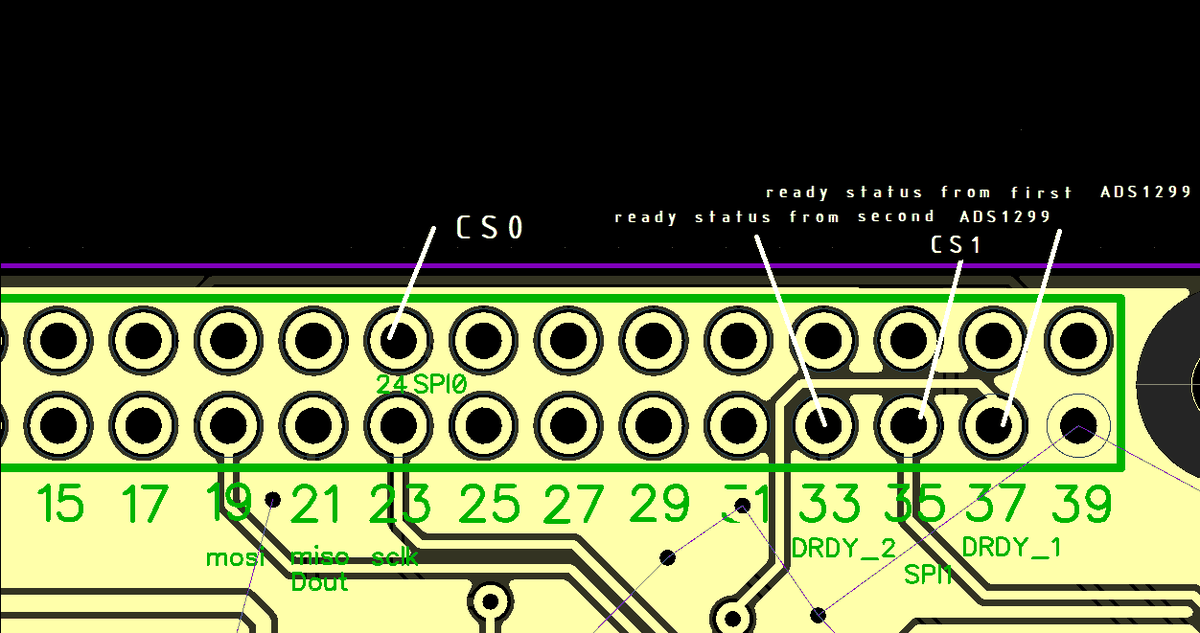
| 19 | GPIO 10 | SPI0 MOSI | Both |
| 21 | GPIO 9 | SPI0 MISO | Both |
| 23 | GPIO 11 | SPI0 SCLK | Both |
| 24 | GPIO 8 | SPI0 CE0 | #1 (ch 1–8) |
| 35 | GPIO 19 | Chip select, driven by software | #2 (ch 9–16) |
| 37 | GPIO 26 | DRDY 1, active low | #1 |
| 33 | GPIO 13 | DRDY 2, active low | #2 |
| Pi | GPIO chip |
|---|---|
| Raspberry Pi 4 | /dev/gpiochip0 |
| Raspberry Pi 5 | The chip labelled pinctrl-rp1 in gpiodetect (/dev/gpiochip4 on older OS releases, /dev/gpiochip0 on newer ones) |
SPI settings
| Setting | Value |
|---|---|
| Devices | /dev/spidev0.0 for chip 1, /dev/spidev0.1 for chip 2 (with GPIO 19 as its chip select) |
| Mode | 1 (CPOL 0, CPHA 1) |
| Bit order | MSB first |
| Word size | 8 bits |
| Clock | 4 MHz in the current SDK script. PiEEG Server uses 4 MHz on Pi 4 and 2 MHz on Pi 5. Lower it (1 MHz) if you see glitches. |
Data frame
Each chip delivers a 27-byte frame per sample:
| Bytes | Content |
|---|---|
| 1–3 | ADS1299 status word (normally 0xC0 0x00 0x08) |
| 4–6 | Channel 1 of this chip |
| … | … |
| 25–27 | Channel 8 of this chip |
Chip 1 gives channels 1–8, chip 2 gives channels 9–16. Each channel is a 24-bit, big-endian, two's-complement value. The SDK only accepts a sample when chip 2's status word is 0xC0 0x00 0x08, which filters out bad frames.
Converting to microvolts
This is the conversion used by the PiEEG SDK scripts and PiEEG Server:
raw = (b[0] << 16) | (b[1] << 8) | b[2]   # 3 bytes of one channel
if raw & 0x800000:                       # negative value
    raw -= 16777214
uV = raw * 4.5 / 16777215 * 1_000_000    # about 0.268 µV per count
Reading a sample
import spidev, gpiod                      # gpiod==1.5.4

chip = gpiod.chip("0")                    # see the GPIO chip table above
cs2 = chip.get_line(19)                   # chip select for ADS1299 #2
# ... request cs2 as output (high), DRDY 26 and 13 as inputs,
#     open spi1 = spidev 0.0 and spi2 = spidev 0.1 (mode 1),
#     configure both chips (see below), then for every sample:

wait_for_drdy(drdy1)                      # wait for GPIO 26 high → low
frame1 = spi1.readbytes(27)               # channels 1–8

wait_for_drdy(drdy2)                      # wait for GPIO 13 high → low
cs2.set_value(0)
frame2 = spi2.readbytes(27)               # channels 9–16
cs2.set_value(1)
Full working version: pieeg16_drdy_only.py (opens in a new tab).
ADS1299 commands
| Command | Code |
|---|---|
| WAKEUP | 0x02 |
| RESET | 0x06 |
| START | 0x08 |
| STOP | 0x0A |
| RDATAC (read data continuously) | 0x10 |
| SDATAC (stop continuous read) | 0x11 |
Write a register with three bytes: [0x40 | address, 0x00, value]. Read one with [0x20 | address, 0x00, 0x00]. For chip 2, pull GPIO 19 low around each transfer.
Default register settings
Both chips get the same settings. Start-up sequence used by PiEEG software, chip 1 first, then chip 2: WAKEUP, STOP, RESET, SDATAC, write the registers below, then RDATAC and START.
| Address | Register | Value | Meaning |
|---|---|---|---|
0x01 | CONFIG1 | 0x96 | 250 SPS |
0x02 | CONFIG2 | 0xD4 | Internal test-signal settings (not used in normal mode) |
0x03 | CONFIG3 | 0xFF | Internal reference buffer on, internal bias reference, bias buffer on |
0x04 | LOFF | 0x00 | Lead-off detection off |
0x05–0x0C | CH1SET–CH8SET | 0x00 | Normal electrode input, gain 1 |
0x0D | BIAS_SENSP | 0x00 | |
0x0E | BIAS_SENSN | 0x00 | |
0x0F | LOFF_SENSP | 0x00 | |
0x10 | LOFF_SENSN | 0x00 | |
0x11 | LOFF_FLIP | 0x00 | |
0x14 | GPIO | 0x80 | |
0x15 | MISC1 | 0x20 | SRB1 on: the reference electrode is shared by all channels |
0x17 | CONFIG4 | 0x00 | Continuous conversion |
Noise self-test: set every CHnSET on both chips to 0x01 (input shorted). The signal should stay within a few µV. If it does, the board is fine and any noise comes from the cables, electrodes or surroundings. See Noise elimination.
Changing CONFIG1–3 changes the sample rate or reference. PiEEG Server expects 250 SPS on both chips.