Signals & Projects
What real PiEEG XR recordings look like, open data to practise with, and projects to build on.
Example signal: blinking 4-3-2-1
Blinking 4 times, then 3, 2 and 1, with the mask's dry electrodes. The signal is band-pass filtered to 1–40 Hz and each channel is shifted down for clarity. Every group of blinks is clearly visible on all 8 channels.
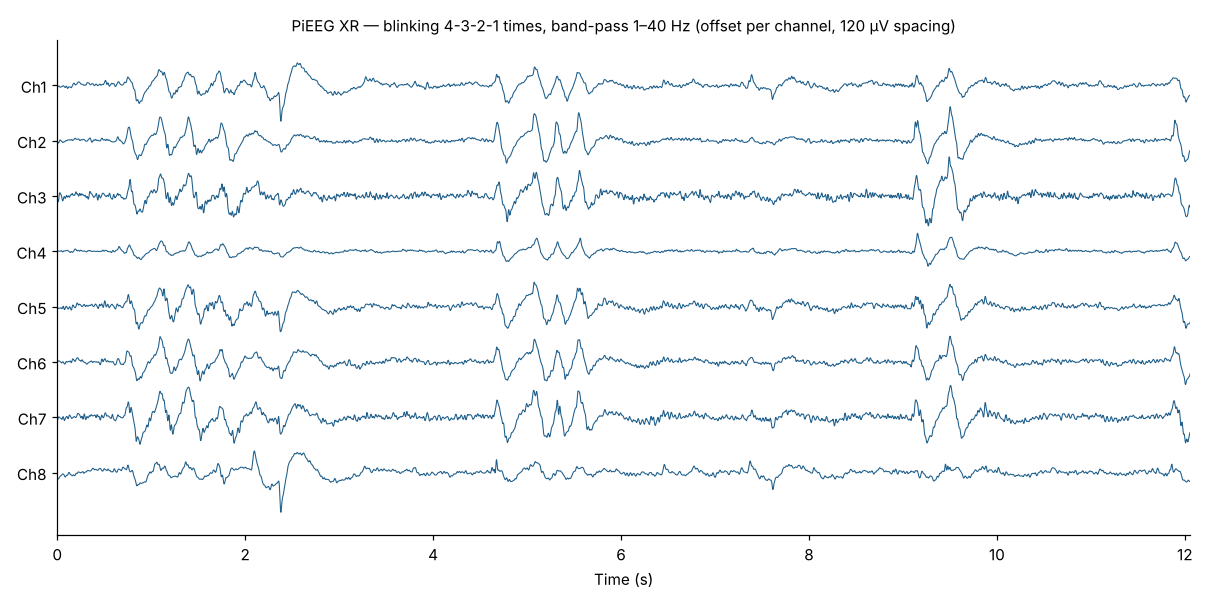
Blinks, eye movements and facial expressions are large on the forehead electrodes. That makes PiEEG XR great for expression and eye-based control, and means you should mark or remove them before analysing brain rhythms.
Dataset
In the Datasets (opens in a new tab) folder of the PiEEG XR repository. 8 channels, about 250 samples per second, values in µV.
| File | Content | Size |
|---|---|---|
Raw Data EEG Blinking 4-3-2-1.csv | Raw data, with the usual DC offset | 3,805 samples (about 15 s) |
Data Band Pass (1-40 Hz) EEG Blinking 4-3-2-1.csv | The same test after a 1–40 Hz band-pass filter | 3,015 samples (about 12 s) |
Columns: timestamp (Unix time, seconds), ch1…ch8.
Projects
Brain-reactive VRChat avatar
Relax to raise your alpha power and watch your avatar's ears perk up. PiEEG Server sends five EEG band values to VRChat over OSC, and the avatar's animator or PhysBones react to them. See Software → VRChat avatar, the tutorial (opens in a new tab) and the video (opens in a new tab).
Face Trainer
A mini-game in PiEEG Cloud that uses the mask's muscle signals to recognise facial expressions. Watch the video (opens in a new tab).
VR games with BodyPress
See your signals as an overlay in VR, or play: VR overlay demo (opens in a new tab) · tennis with PiEEG XR (opens in a new tab).
WebXR
PiEEG XR was built for browser-based XR: attention, relaxation and focus drive avatar behaviour in a WebXR scene, with no native app. See the PiEEG XR paper (opens in a new tab).