Electrodes & Pinout
Overview
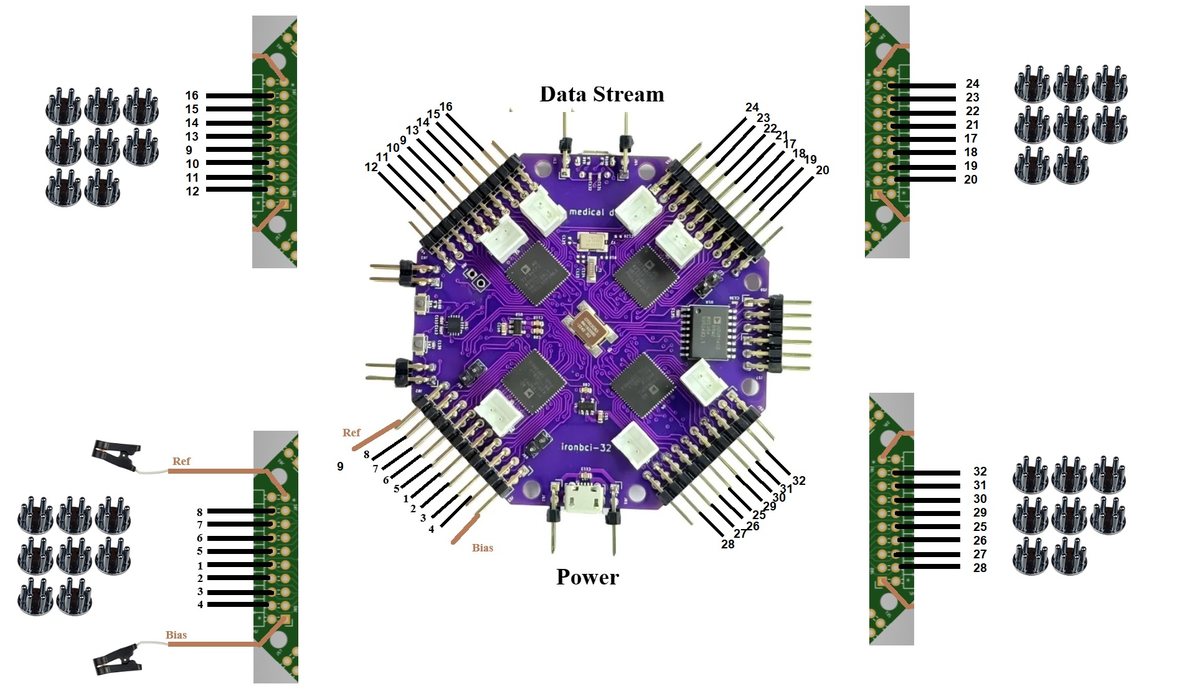
IronBCI-32 has four 2.54 mm headers, one for each AD7771 converter. Each header carries 8 channels.
| Header | Channels | Also carries |
|---|---|---|
| Bottom left | 1–8 | Reference and bias ear clips |
| Top left | 9–16 | |
| Top right | 17–24 | |
| Bottom right | 25–32 |
The Data Stream USB port is at the top, between headers 9–16 and 17–24. The Power USB port is at the bottom, between headers 1–8 and 25–32.
Top and bottom rows
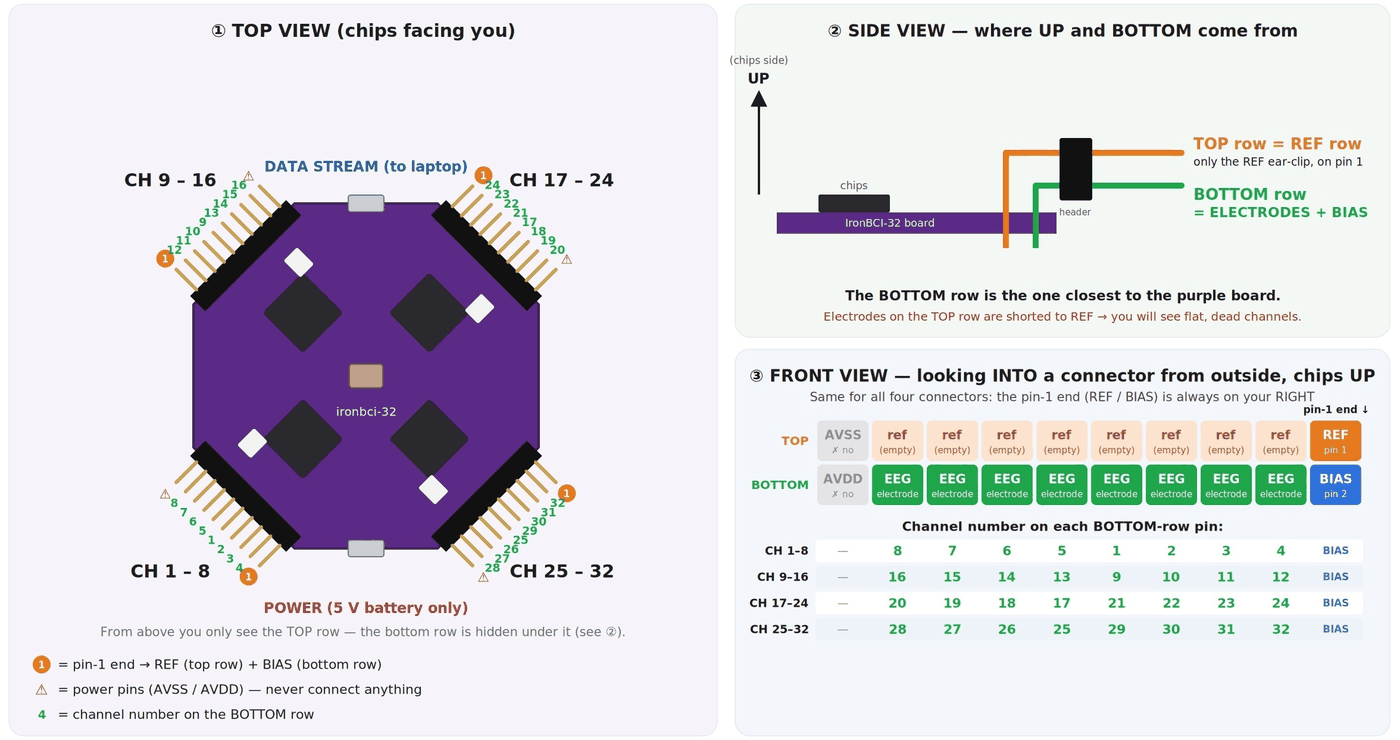
Each header has two rows of pins. This is the most common source of mistakes.
| Row | What goes there |
|---|---|
| Bottom row (closest to the board) | The 8 EEG electrodes, plus BIAS on pin 2 |
| Top row (further from the board) | Only the REF ear clip, on pin 1. Leave the rest empty. |
| Outer end pins (AVSS / AVDD) | Power pins. Never connect anything. |
An electrode plugged into the top row is shorted to the reference and shows a flat, dead channel. If channels look dead, check the row first.
Pin order
Looking into a connector from outside, with the chips facing up, the pin-1 end (REF / BIAS) is on your right. The channels on the bottom row are not in simple order:
| Bottom-row pin (left → right) | CH 1–8 | CH 9–16 | CH 17–24 | CH 25–32 |
|---|---|---|---|---|
| 1st (power pin) | AVDD, leave empty | AVDD | AVDD | AVDD |
| 2nd | 8 | 16 | 20 | 28 |
| 3rd | 7 | 15 | 19 | 27 |
| 4th | 6 | 14 | 18 | 26 |
| 5th | 5 | 13 | 17 | 25 |
| 6th | 1 | 9 | 21 | 29 |
| 7th | 2 | 10 | 22 | 30 |
| 8th | 3 | 11 | 23 | 31 |
| 9th | 4 | 12 | 24 | 32 |
| 10th (pin-1 end) | BIAS | BIAS | BIAS | BIAS |
On the top row above, only the pin-1 end is used (REF). The other top-row pins are internally tied to REF, and the leftmost one is a power pin (AVSS). Leave them all empty.
Reference and bias
| Electrode | Where it goes on the head | Where it plugs in |
|---|---|---|
| Reference | Ear clip on one earlobe | CH 1–8 header, top row, pin 1 |
| Bias | Ear clip on the other earlobe | CH 1–8 header, bottom row, pin 2 |
The reference and bias clips matter most. A loose ear clip makes every channel noisy at once. Clean the earlobes and make sure both clips sit firmly before you look at anything else.
Electrode layout
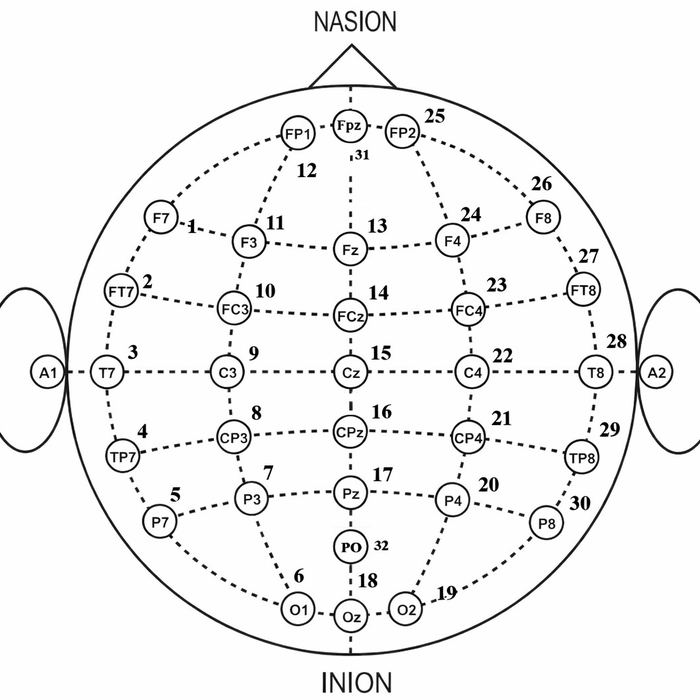
This is the 32-channel layout from the IronBCI-32 repository, used with the PiEEG 32-channel wet cap. It covers the whole scalp on the 10-20 system.
| Ch | Position | Ch | Position |
|---|---|---|---|
| 1 | F7 | 17 | Pz |
| 2 | FT7 | 18 | Oz |
| 3 | T7 | 19 | O2 |
| 4 | TP7 | 20 | P4 |
| 5 | P7 | 21 | CP4 |
| 6 | O1 | 22 | C4 |
| 7 | P3 | 23 | FC4 |
| 8 | CP3 | 24 | F4 |
| 9 | C3 | 25 | Fp2 |
| 10 | FC3 | 26 | F8 |
| 11 | F3 | 27 | FT8 |
| 12 | Fp1 | 28 | T8 |
| 13 | Fz | 29 | TP8 |
| 14 | FCz | 30 | P8 |
| 15 | Cz | 31 | Fpz |
| 16 | CPz | 32 | POz |
Channels 1–12 cover the left side, 13–18 the midline, and 19–30 the right side, with Fpz and POz on 31 and 32. You can use any other layout. Keep a note of which channel went where.
Fitting the cap
- Measure the head and pick the right cap size.
- Find Cz (halfway between nose and the back of the head, halfway between the ears) and align the cap with it.
- Inject a small amount of conductive gel under each electrode and work it through the hair with the blunt syringe tip.
- Attach the ear clips to clean earlobes.
- Bundle the 32 leads together and keep them short and still. Moving cables show up as noise.