Firmware
IronBCI-32 ships with firmware already installed. You only need this page if you are asked to update it, or if the board stops streaming and nothing in Troubleshooting helps.
What you need
| Item | Details |
|---|---|
| ST-Link V2 programmer | With its 4 jumper wires |
| STM32CubeProgrammer | Free tool from STMicroelectronics: st.com/stm32cubeprog (opens in a new tab) |
| Firmware file | hex/ironbci32.hex (opens in a new tab) |
| 5 V USB battery | To power the board while flashing |
⚠️
Flash with no electrodes on a person.
Wire the ST-Link
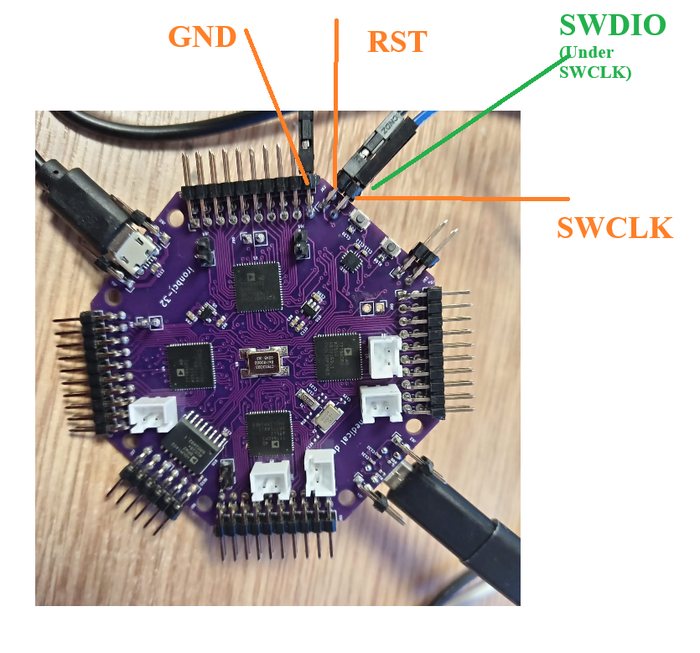
Connect the ST-Link to the 4-pin programming header on the board:
| ST-Link | IronBCI-32 |
|---|---|
| GND | GND |
| RST | RST |
| SWDIO | SWDIO |
| SWCLK | SWCLK |
Power the board
Plug the 5 V USB battery into the Power port, then plug the ST-Link into the computer.
Flash
- Open STM32CubeProgrammer, choose ST-LINK and click Connect.
- Open
ironbci32.hex. - Click Download to write it to the board.
- Disconnect the ST-Link and unplug the power for a few seconds.
Check
Power the board again and connect the data cable. The serial port should appear and stream as before.
Build from source
The STM32H743 firmware project (Makefile, GCC Arm toolchain, OpenOCD scripts) is in Framework (opens in a new tab). It is marked as a beta. Use the ready-made .hex file unless you want to change the firmware.
Hardware files
| Folder | Content |
|---|---|
Electrical (opens in a new tab) | KiCad schematic and PDF |
Gerber (opens in a new tab) | Gerber files for PCB manufacturing (70 × 70 mm, 4 layers, 1.6 mm FR4) |