How to Start
From the box to live EEG on your computer, in seven steps.
Gather the parts
You need the ardEEG, an Arduino UNO R4 WiFi, a small 5 V power bank, a USB-C cable, 8 electrodes with two ear clips, a cap, and a computer on Wi-Fi. See What's in the Box.
Find your computer's IP address
The Arduino sends data to your computer's address on the Wi-Fi network.
| System | How |
|---|---|
| Windows | ipconfig in a terminal → IPv4 Address of the Wi-Fi adapter |
| macOS | System Settings → Wi-Fi → Details → IP address |
| Linux | ip addr → the address of the Wi-Fi interface |
It looks like 192.168.1.241. Note it down.
Upload the Arduino sketch
- Install the Arduino IDE (opens in a new tab) and the Arduino UNO R4 Boards package (Tools → Board → Boards Manager).
- Open
1.Send_data_via_wifi.ino(opens in a new tab). - Enter your Wi-Fi name and password:
char ssid[] = "Wifi Name"; char pass[] = "password"; - Enter your computer's IP address in this line:
udp.beginPacket("192.168.1.241", 13900); - Plug the Arduino into the computer with USB-C, choose Arduino UNO R4 WiFi and its port, and click Upload.
- Unplug the USB cable.
Mount the shield
Line up the ardEEG with the Arduino's headers and press it down evenly until all pins are seated. Do this with the Arduino unpowered.
Connect the electrodes
| Connector | Electrode | Where it goes |
|---|---|---|
| Channels 1–8 | 8 EEG electrodes in the cap | Scalp positions of the 10-20 system |
| Reference | Ear-clip electrode | One earlobe |
| Bias | Ear-clip electrode | The other earlobe |
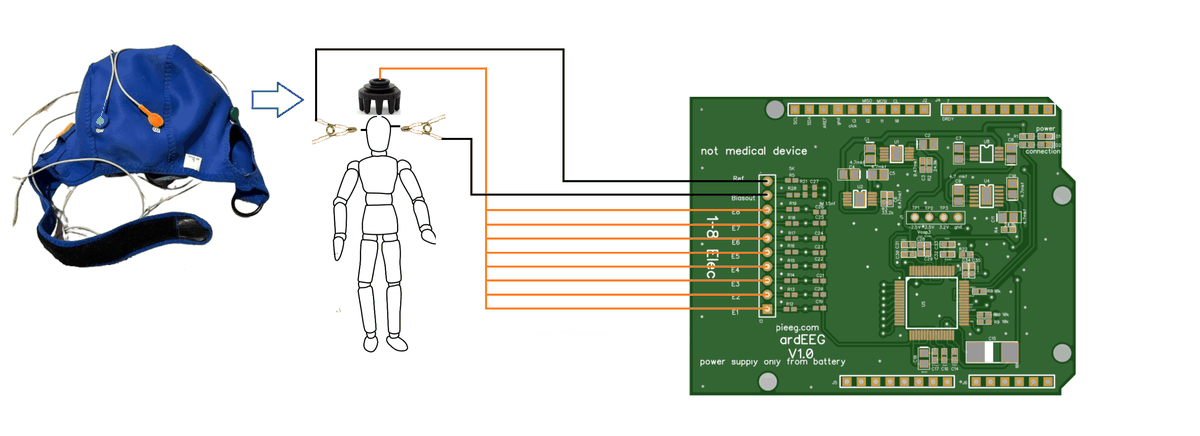
Details and a suggested montage: Electrodes & Pinout.
Power on from the battery and run Python
- Plug the power bank into the Arduino. It joins your Wi-Fi and starts sending.
- On the computer, install the libraries and run the receiver:
pip install matplotlib scipy
git clone https://github.com/Ildaron/ardEEG.git
cd ardEEG/software/python- Open
1.Alpha_real_time.py, setUDP_IPto your computer's IP (the same address as in the sketch), then run it:
python 1.Alpha_real_time.pyA window opens with 8 live graphs.
The ardEEG has no isolation. While electrodes are on a person, the Arduino must run from the power bank only, never plugged into the computer.
Check the signal
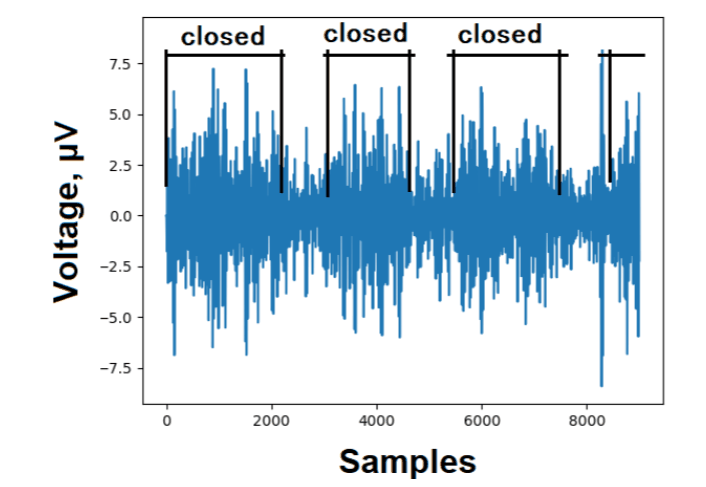
The receiver script shows the 8–12 Hz (alpha) band. Sit still and relax the face, then:
| Test | What you should see |
|---|---|
| Sit still for 30 seconds | All 8 channels settle to a small, steady signal |
| Close your eyes for 10 seconds | The alpha signal grows, then shrinks when the eyes open |
| Chew or blink | Large bursts (best seen with a 1–40 Hz filter) |
Next steps
- Change the filter, save data, check the speed: see Software.
- No data or noisy? See Troubleshooting and Noise elimination.