How to Start
From a bare Raspberry Pi to live EEG in your browser, in seven steps.
Gather the parts
You need the PiEEG-8, a Raspberry Pi 4 or 5, a 5 V power bank, electrodes with two ear clips, and a cap. See What's in the Box.
Prepare the Raspberry Pi
- Flash Raspberry Pi OS (64-bit, with desktop) to the microSD card with Raspberry Pi Imager (opens in a new tab).
- Boot the Pi once, finish the first-run wizard and connect it to the internet (needed only for installing software).
SPI must be on for the Pi to talk to the shield. The PiEEG Server installer turns it on for you. To do it by hand: sudo raspi-config → Interface Options → SPI → Enable, then reboot.
Mount the shield
- Shut down the Pi and unplug the power bank.
- Line up the PiEEG-8 with the 40-pin GPIO header, so the board sits over the Pi and pin 1 matches pin 1.
- Press it down evenly until every pin is fully seated.
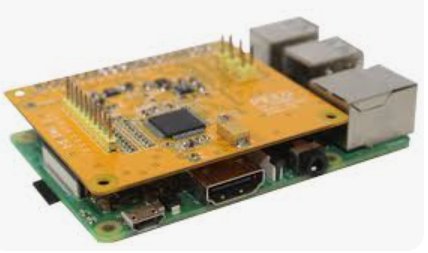
Never plug in or remove the shield while the Pi is powered.
Connect the electrodes
| Connector | Electrode | Where it goes |
|---|---|---|
| Channels 1–8 | 8 EEG electrodes in the cap | Scalp positions of the 10-20 system |
| Reference | Ear-clip electrode | One earlobe |
| Bias | Ear-clip electrode | The other earlobe |
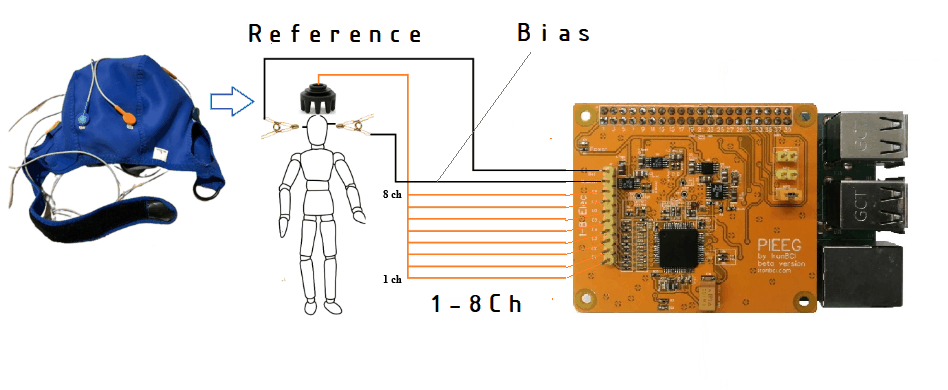
Full details, header layout and a default montage: Electrodes & Pinout.
Power on from the battery
- Connect the monitor, wired keyboard and mouse. The monitor must be powered from the power bank or the Pi.
- Plug the power bank into the Raspberry Pi.
- The LED on the PiEEG-8 lights up once the shield is powered.
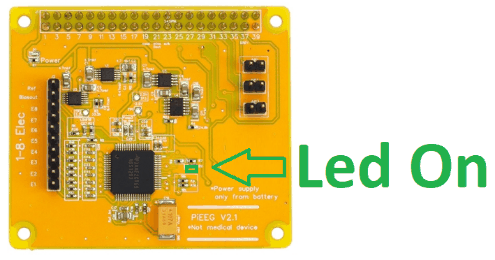
The PiEEG-8 has no isolation from its power supply. While electrodes are on a person, the Pi, the shield and everything cabled to them must run from the power bank only. No wall charger, no desktop power supply, no USB cable to a mains-powered computer.
Install and start PiEEG Server
Open a terminal on the Pi and run:
curl -sSL https://raw.githubusercontent.com/pieeg-club/PiEEG-server/main/install.sh | bash
sudo reboot        # first time only: enables SPI
The installer creates a service that starts the server on every boot. The service starts in 16-channel mode by default, so set it to PiEEG-8 once:
sudo sed -i 's|bin/pieeg-server|bin/pieeg-server --device pieeg8|' /etc/systemd/system/pieeg-server.service
sudo systemctl daemon-reload
sudo systemctl restart pieeg-server
Or run it by hand in a terminal (stop the service first with sudo systemctl stop pieeg-server):
pieeg-server --device pieeg8Check the setup at any time with:
pieeg-server doctorCheck the signal
Open the dashboard at http://localhost:1617 (opens in a new tab) on the Pi, or http://raspberrypi.local:1617 (opens in a new tab) from a battery-powered laptop on the same network. Click Connect.
Sit still, relax the face and run these quick tests. If they behave as described, you are recording real biosignals.
| Test | What you should see |
|---|---|
| Sit still for 30 seconds | All 8 channels settle. Flat lines or huge values mean a loose electrode. |
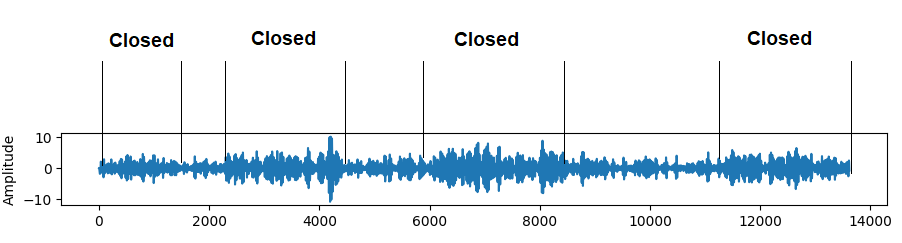
| Close your eyes for 10 seconds | Alpha (8–13 Hz) rises on the back-of-head channels (O1, O2), then drops when the eyes open |
| Blink a few times | Large slow spikes on the front channels (Fp1, Fp2) |
| Clench the jaw | Bursts of high-frequency noise on all channels. That is muscle (EMG), not brain activity. |
A blink or jaw clench is a big signal, but it is not a thought. Learning to recognise these artifacts is the first step to clean EEG.
Next steps
- Record:
pieeg-server record session.csv --device pieeg8saves raw µV to CSV. See Recording. - Stream to your code: WebSocket, LSL, OSC and webhooks. See Software.
- Noisy signal? Work through Troubleshooting and Noise elimination.