How to Start
From the box to live signals in your headset or browser, in seven steps. The example shows a Meta Quest 3.
Gather the parts
You need the PiEEG XR made for your headset, a power bank or battery head strap, a USB-A to USB-C cable, and alcohol pads. See What's in the Box.
Replace the face mask
- Remove the headset's original facial interface.
- Line up the four buckles of the PiEEG XR mask with the headset.
- Press to snap in the two back buckles.
- Press to snap in the two front buckles.
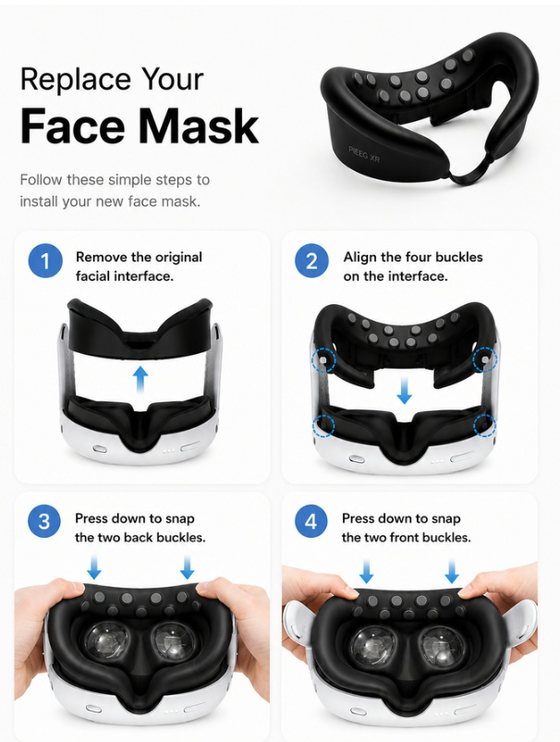
Prefer your own mask? Remove just the silicone insert from the PiEEG XR mask and fit it into your headset's original facial interface. Adjust it until it sits firmly with no gaps or bending.
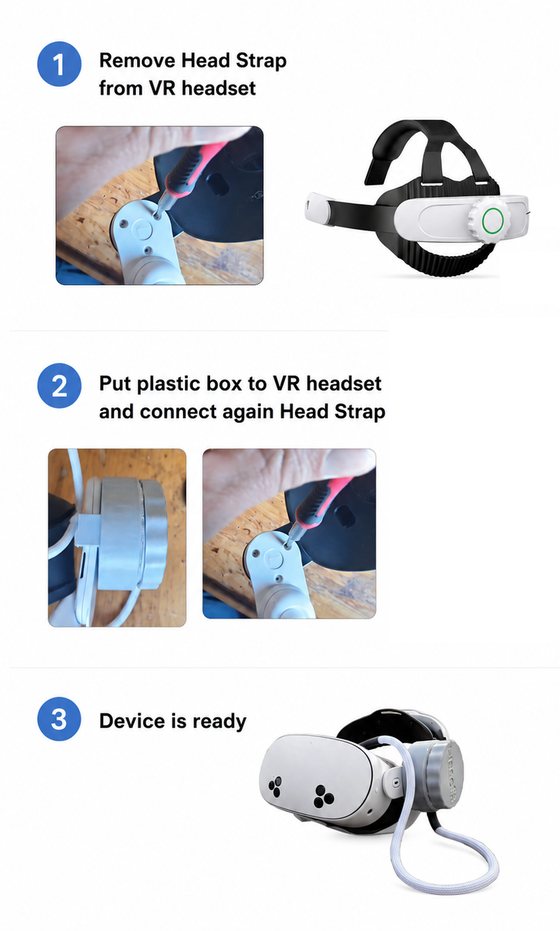
Mount the BCI box
- Remove the head strap from the headset.
- Place the BCI box against the headset, then reattach the strap so it holds the box.
- Route the cable from the mask to the box.
Power on
Connect the 5 V power bank (or battery strap) to the box with the USB-A to USB-C cable. The box starts advertising over Bluetooth as PiEEG XR.
Battery power only. Never connect the box to a wall charger or to a computer on mains power while you're wearing it.
Clean and put it on
- Wipe the forehead and temples with an alcohol pad, and let the skin dry.
- Wipe the electrodes in the mask.
- Put the headset on and tighten the strap so the mask presses firmly and evenly on the face.
Connect
- Install BodyPress (opens in a new tab) from the Meta Quest Store.
- Open it and connect to
PiEEG XR.
Check the signal
Sit still, relax the face and wait a few seconds for the filter to settle. Then:
| Test | What you should see |
|---|---|
| Every channel moving | A gentle line on each channel. A perfectly flat line means that electrode isn't touching. |
| Blink hard 3–5 times | Large, sharp spikes, strongest on the front (forehead) channels |
| Look left, then right | Slower swings, in opposite directions on the left and right channels |
| Clench the jaw | A burst of high-frequency fuzz that stops when you relax |
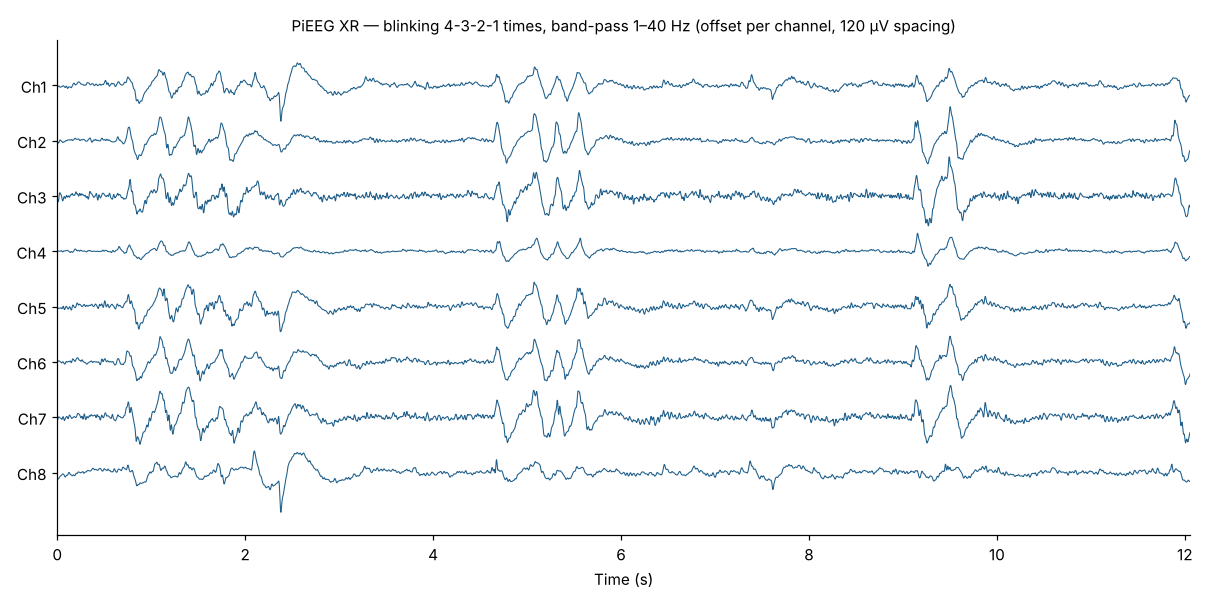
The blink test is your one-second sanity check. If blinking shows nothing on the front channels, those electrodes aren't touching. Reseat the mask and tighten the strap before going further.
Want to try facial expressions? In PiEEG Cloud, open Mini-Games → Face Trainer. Watch the video (opens in a new tab).
Next steps
- Use it in VR: BodyPress on the Quest, or a brain-reactive VRChat avatar. See Software.
- Moving while recording? Read Recording During Activity.
- Problems? See Troubleshooting & FAQ.