PiEEG Studio (Browser & Cloud Preview)
Browser-based MNE-Python EEG analysis and MOABB BCI benchmarking — zero install required
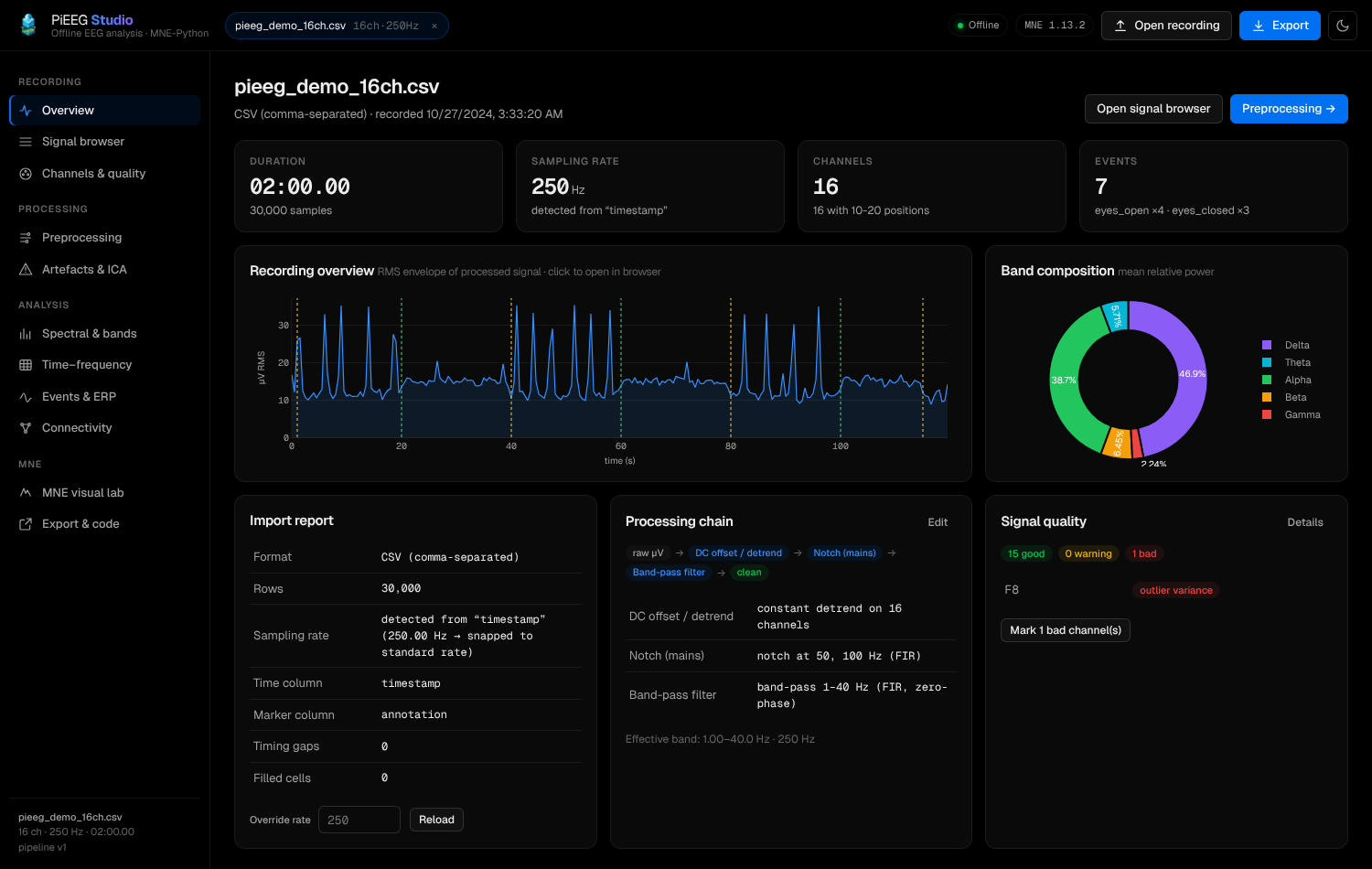
PiEEG Studio (opens in a new tab) is now available directly in the browser on PiEEG Cloud (cloud.pieeg.com). Launch it from the Session Lobby header, click Studio ↗ on any saved session in your Saved Sessions list, or send a freshly captured in-memory browser recording straight from the playback toolbar — without installing Python or MNE locally.
If you also run the Community Edition locally (http://127.0.0.1:1618) on your machine, cloud.pieeg.com automatically detects it (GET http://127.0.0.1:1618/api/health) and routes Studio actions to your local instance for unlimited file sizes, 150+ online MOABB datasets, and native Qt desktop MNE browsers.
Cloud Preview vs. Local Community Edition
| Capability | Browser Cloud Preview (pieeg-studio.fly.dev) | Local Community Edition (127.0.0.1:1618) |
|---|---|---|
| Installation | None — runs in any browser | pip install "pieeg-server[studio,studio-moabb]" |
Auto-selection from cloud.pieeg.com | Default fallback when local port 1618 is not running | Automatically preferred when reachable on 127.0.0.1:1618 |
| Session & data isolation | Strict per-browser X-Studio-Session (ps-sid) + 15-min idle purge | 100% local disk & memory |
| Direct Cloud session loader | Yes (?cloudSession=<id> + event markers) | Yes |
| In-memory recording handoff | Yes (POST /api/datasets CSV blob + annotations) | Yes |
| Max upload / dataset quota | 25 MB per file · up to 4 active datasets per session | Unlimited (RAM-bound) |
| MOABB BCI Benchmark Lab | Built-in offline synthetic MI / P300 / SSVEP + open session tabs | + 150+ online public NeuroTechX MOABB datasets & custom disk cache |
| Native desktop MNE windows | Browser MNE Visual Lab (PNG) + .ipynb export for Colab/Kaggle | Interactive Qt (raw.plot()) & matplotlib desktop windows |
Launching Studio from PiEEG Cloud
From the Session Lobby (cloud.pieeg.com/lobby)
Click Studio in the top navigation bar (or More → PiEEG Studio) to open your isolated Studio workspace in a new tab. You can drag-and-drop any local .csv, .xlsx, .edf, .bdf, .gdf, .fif, .vhdr, or .set recording, or click Try a demo recording to generate a 16-channel synthetic session with eyes-open/closed blocks, blinks, and 50 Hz mains noise.
From Saved Sessions
Open Saved Sessions in the dashboard and click Studio ↗ next to any cloud recording. Studio downloads the session CSV (/v1/sessions/{id}/download) and its cloud event markers (/v1/sessions/{id}/events) directly into MNE-Python.
From an Unsaved In-Memory Recording (SessionViewer)
Right after capturing a recording in your browser — even before publishing or signing in — click Studio ↗ in the playback toolbar. The browser uploads the in-memory CSV Blob and your frame annotations directly to your isolated Studio session (POST /api/datasets) with 10–20 montage mapping enabled.
Automatic local handoff: Whenever you click Studio or Studio ↗ in cloud.pieeg.com, the client probes http://127.0.0.1:1618/api/health (350 ms timeout). If you have pieeg-studio running locally, it opens your local instance; otherwise it launches the hosted Cloud Preview at https://pieeg-studio.fly.dev.
Privacy & Per-User Isolation
Because the Cloud Preview runs on shared infrastructure, every browser session is strictly sandboxed:
- Per-browser Session ID (
ps-sid): Your browser generates a persistent UUID (localStorage["ps-sid"]) sent via theX-Studio-Sessionheader. All in-memory MNEDatasetobjects, cached figures, and CSP patterns are keyed to yoursid— other users can never list or access your recordings. - Zero-leak token transport: When opening a private saved session from
cloud.pieeg.com, your Cloud access token is passed in the URL hash (#sid=...&token=...) so it is never sent in HTTPRefererheaders or server access logs, and Studio strips the hash from the address bar immediately after loading. - 15-minute inactivity reaper & scale-to-zero: A background reaper purges any session's datasets, temporary files, and cached plots after 15 minutes of inactivity (
PIEEG_STUDIO_IDLE_TTL_S=900), and the Fly.io machine automatically stops when idle.
Analysis & Preprocessing Views
PiEEG Studio in the browser provides the full 11-view MNE-Python workflow:
| View | Highlights |
|---|---|
| Overview | Recording summary, sampling rate & 10–20 montage check, timing-gap diagnostics, quick PSD & channel preview |
| Signal browser | Multi-channel WebGL viewer (scattergl), min/max overview minimap, raw vs. processed overlay, DC removal toggle, and click-to-annotate markers |
| Channels & quality | Per-channel std, peak-to-peak, RMS, 50/60 Hz mains noise %, kurtosis, Hjorth parameters (activity, mobility, complexity), and bad-channel flagging |
| Preprocessing | Reorderable live pipeline: DC offset / linear detrend, centered Hampel spike filter, FIR/IIR notch (+ harmonics), FIR/IIR band-pass, bad-channel spherical-spline interpolation, CAR / custom re-reference, resampling, cropping, and ICA — with live before/after PSD comparison and mne.viz.plot_filter response |
| Artefacts & ICA | Automatic blink (frontal EOG proxy), amplitude (BAD_peak), and muscle (BAD_muscle) detectors; FastICA / Extended Infomax / Picard decomposition with automatic ocular component suggestions, component topomaps, properties, and source browser |
| Spectral & bands | Welch / multitaper PSD, $\delta / \theta / \alpha / \beta / \gamma$ absolute & relative band powers, band-power ratios ($\theta/\beta$, $\alpha/\theta$, $\beta/(\alpha+\theta)$), IAF, SEF95, spectral entropy, $1/f$ slope, frontal alpha asymmetry ($\ln R - \ln L$), and mne.viz.plot_topomap band maps |
| Time–frequency | Per-channel short-time spectrogram and whole-session stacked band-power timeline |
| Events & ERP | Epoching around annotations or fixed windows, baseline correction, peak-to-peak rejection, condition averages $\pm$ SEM, GFP, evoked.plot_joint, and epochs.plot_image |
| Connectivity | Coherence, PLV, wPLI, and band-limited correlation rendered as an interactive adjacency matrix and MNE circular connectivity diagram |
| MNE visual lab | Publication-ready MNE figures (raw.plot, compute_psd().plot, plot_sensors, plot_topomap, plot_filter, ica.plot_components) + live syntax-highlighted MNE Python code |
| BCI & MOABB | Standardized BCI benchmark lab comparing 7 spatial/Riemannian decoding pipelines with Stratified K-Fold CV, ROC-AUC, confusion matrices, and CSP pattern topomaps |
| Export & code | .xlsx (6-sheet workbook), .csv, .fif, .edf, .html (mne.Report), .py, .ipynb (Colab/Kaggle-ready Jupyter notebook), .json features, and reusable pieeg_pipeline.json presets |
BCI & MOABB Benchmark Lab
The BCI & MOABB tab brings MOABB (Mother of All BCI Benchmarks) (opens in a new tab), MNE epoching, and Riemannian geometry decoding directly into PiEEG Studio:
- Synthetic & Recorded Paradigms: Generate instant offline synthetic datasets (Motor Imagery, P300 / ERP, SSVEP) subsetted to PiEEG channel layouts (
PiEEG-8,PiEEG-16,IronBCI-32, or all channels), or benchmark your own annotated recordings open in Studio tabs (Within-Session CV or Cross-Session across open tabs). - 7 Built-in Decoding Pipelines:
CSP + LDA— Common Spatial Patterns + Shrinkage LDACSP + SVM— Common Spatial Patterns + RBF SVMRiemannian TS + LR— SPD Covariance + Riemannian Tangent Space + Logistic RegressionRiemannian MDM— Minimum Distance to Riemannian MeanLogVar + LDA— Channel Log-Variance + Shrinkage LDABandPower + RF— Welch Band Powers + Random ForestERP-Xdawn + LDA— ERP Spatial-Temporal Covariance + LDA
- Visual Diagnostics & Reproducible Script: Compare pipeline Accuracy, Balanced Accuracy, F1, and ROC-AUC against chance level, inspect per-pipeline confusion matrices and MNE CSP spatial pattern topomaps (
csp_patterns.png), and download the standalonepieeg_moabb_benchmark.pyscript.
| Environment Variable | Default | Description |
|---|---|---|
| `PIEEG_CLOUD_URL` | `https://pieeg-cloud.fly.dev` | PiEEG Cloud API base URL for loading saved sessions and event markers |
| `PIEEG_STUDIO_IDLE_TTL_S` | `900` | Seconds of inactivity (15 min) before a browser session's datasets are purged |
| `PIEEG_STUDIO_MAX_DATASETS` | `4` | Maximum concurrent open datasets per browser session (`X-Studio-Session`) |
| `PIEEG_STUDIO_MAX_UPLOAD_MB` | `25` | Maximum file upload / cloud session download size in MB |
| `VITE_STUDIO_URL` *(frontend)* | `https://pieeg-studio.fly.dev` | Custom Studio URL used by `cloud.pieeg.com` |